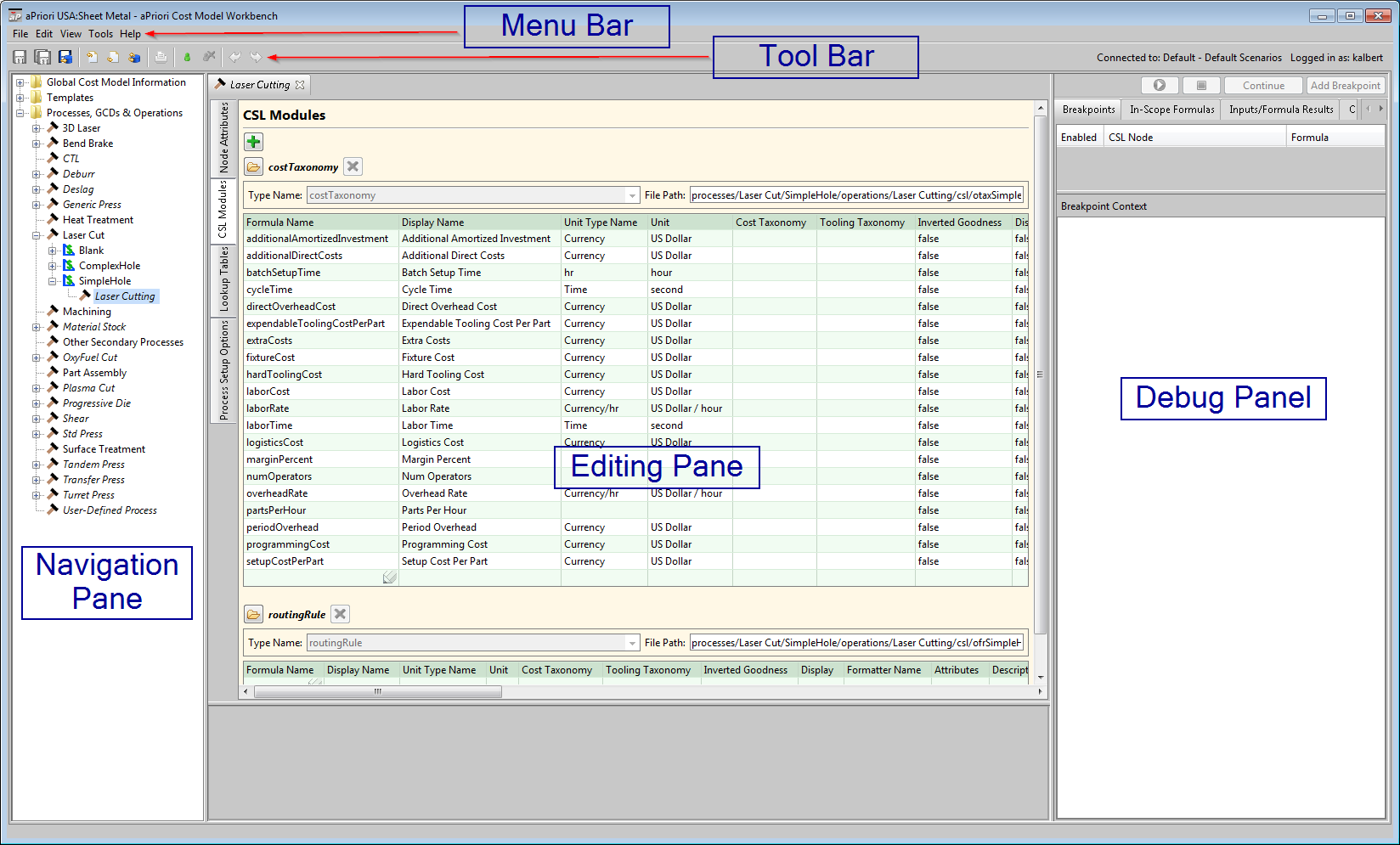
Components of the CMWB Interface
The instructions in this guide refer to the following major elements of the CMWB graphical user interface:
-
Menu bar: provides the standard set of menus: File, Edit, View, Tools, and Help.
Note:
-
Tool bar: displays tool icons that provide shortcuts for operations such as Save, Override Object, and Publish Cost Model.
-
Navigation pane: provides an expandable/collapsible navigation tree with three top-level nodes:
-
Global Cost Model Information: provides access to global data, metadata, and logic for the current cost model.
-
Templates: provides access to the template for each GCD type associated with the current cost model, as well as to the local data, metadata, and logic associated with branch nodes of those templates.
-
Processes, GCDs & Operations displays the process-GCD-operation hierarchy, and provides access to the data, metadata, and logic for each process and operation associated with the current cost model.
-
-
Editing pane: editable display that provides the content of global or node-specific data, metadata, or logic, including formula tables, metadata tables (such as machine type tables), and CSL module content.
-
Debug panel: provides the interface to the CSL debugger, which allows you to set breakpoints, access in-scope formula and input values, and examine evaluation contexts. Use the View menu in the menu bar to show and hide the debug panel.
The following figure shows these elements: